
Content:
- How do I import a template into an initiative?
- Why are certain templates automatically imported when an initiative is created?
- When do I have to add a template manually?
A template represents a use case with predefined requirements that can be imported into an initiative.
1. How do I import a template into an initiative?
Go In an existing initiative in the ‘Requirements’ tab:
- Click on ‘Create use case’
- Select ‘Import from templates’
- Import the desired template
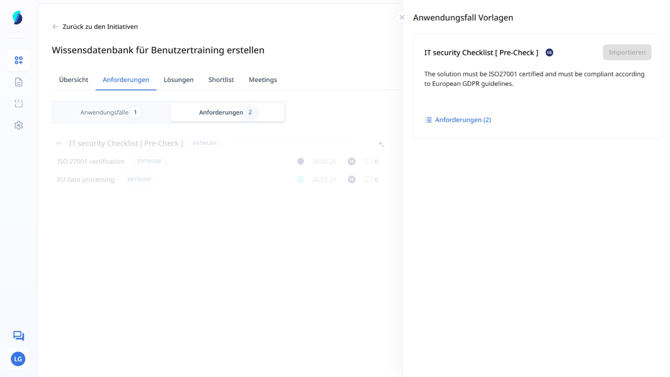
A use case with requirements was successfully created from the template. Note that once a copy of the templates has been imported it must be edited within an initiative - it is not automatically updated when the central template changes!
2. Why are certain templates automatically imported when an initiative is created?
In the templates section, you can set certain templates to be imported automatically when a new initiative is created. This is particularly useful for requirements that always have to be checked for any given demand, such as certain IT security guidelines, which should apply to all initiatives.
If the template section is not displayed, your user does not have the ‘Create and manage templates’ permissions. Further information can be found here: Role and authorisation management
3. When do I have to add a template manually?
A manual import is required if it depends on the initiative which templates are relevant. Typical examples:
- Selection of a critical IT system that processes sensitive data → additional IT security requirements are necessary.
- Different deployment models (e.g. cloud vs. on-premise) → different templates relevant in each case.
In such cases, the appropriate template must be added manually from the list using the instructions for each template.
As a rule, a template should contain a usage instruction that describes when it should be used. These notes are maintained by the template creator and serve as a decision-making aid when selecting the appropriate template.