
Content:
- Definition of too many use cases
- Unrefined requirements
- Suboptimal prioritisation of requirements
- Missing commercial or non-functional requirements
- Requirement titles are the same as a requirement description
- Necessary templates are not imported
Definition of too many use cases
Problem: Use cases are too detailed and numerous and lose their structuring character.
.png?width=670&height=376&name=May%2016%2c%202025%203_37_19%20PM%20-%20Screenshot%20(1).png)
Consequence: Too many and too detailed use cases make it difficult to keep your requirements catalogue clear. The AI solution proposals can be impaired by this, as the focus on the essentials is lost.
Improvement: Use cases as clusters for logically related requirements. The detailed formulation and specification then takes place within these clusters at the level of the individual requirements. Experience has shown that a maximum of 12 use cases should be sufficient to structure your case.
Unrefined requirements
Problem: The fully automatically generated requirements description may be too generic and lacks specificity and depth of detail.
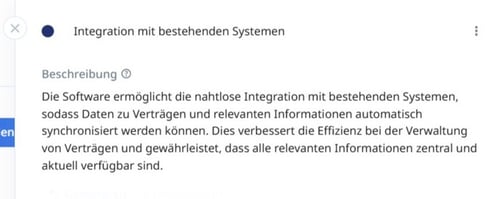
Consequence: A requirement that is formulated too generically is not very meaningful and may lead to misunderstandings.
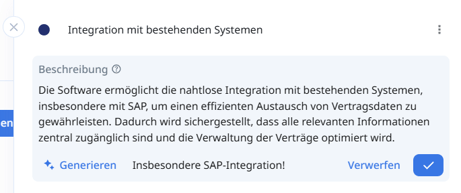
Improvement: Use the ‘Add instructions’ field to add keywords or information that makes it easier for the AI to become more specific when ‘generating’ the requirement description.
Suboptimal prioritisation of requirements
Problem: Requirements are prioritised indiscriminately (e.g. no priority at all or marking all requirements as ‘Must have’).
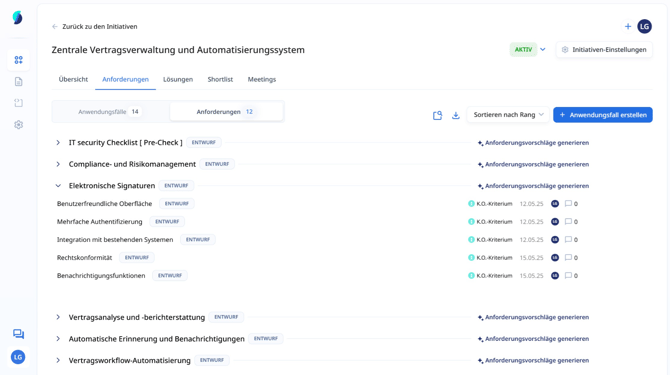
Consequence: Undifferentiated prioritisation makes it difficult to identify critical functions and select suitable solutions.
Improvement: Prioritise requirements carefully and differentiated according to a clear scheme to reflect their actual importance for the success of the project:
-
Must have: Essential requirements that are critical for the system to function.
-
Should have: Important but not vital; they can be left out temporarily if needed.
-
Could have: Desirable features that can improve user experience but are not necessary.
Missing commercial or non-functional requirements
Problem: Commercial and non-functional framework conditions such as budget limits, provider criteria or minimum technical standards are not sufficiently taken into account.
Consequence: Without these framework conditions, it will be difficult for providers or even AI to find out whether the basic requirements for a solution are met or not.
Improvement: Explicitly record and document commercial and essential non-functional requirements as an integral part of your requirements catalogue. Define clear criteria, for example for
- Commercial: e.g. maximum total cost of ownership (TCO), price caps for running costs / licences or implementation costs.
- Supplier criteria: e.g. minimum number of reference customers, company headquarters, etc.
- Technical or IT compliance requirements: e.g. specific security standards (e.g. ISO 27001), data protection compliance (GDPR), etc.
Requirement titles are the same as a requirement description
Problem: The requirement title resembles a detailed description of the requirement, which means it loses its function as a concise identifier.
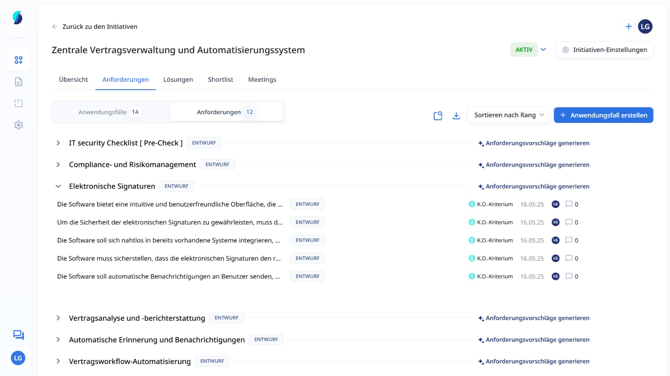
Consequence: Long titles make requirement lists confusing and make it difficult to record, sort and filter.
Improvement: Use the requirement title for a short, clear description (e.g. ‘Invoicing in PDF format’). Details and descriptions belong in the requirement description.
Necessary templates are not imported
Problem: The templates stored in our system for recurring standard checks, such as information security checks, are not imported.
Consequence: If necessary templates are not imported, our system cannot take them into account when proposing solutions.
Improvement: Identify and import relevant templates (e.g. for IT security, compliance) directly via the ‘Import from templates’ function.