
Contents:
- Why create your own solutions?
- How to create your own solution
- What happens after creating it?
- Your tools stay within your tenant
- Tip: add further content such as documents
Why create your own solutions?
Stackgini does not list the solution you want to evaluate in its market database? No problem. You can now create your own solutions within your initiatives and add the web data for these tools yourself. No more waiting for Stackgini to include a new tool. When you find something relevant online, you can add it right away and start evaluating the solution immediately.
How to create your own tool
- Open the "Solutions" page in your initiative.
- Click the plus icon.
- Enter a tool name and the vendor's product website.
- Save the tool via "Add Solution"

Best practice: Use a URL that is as specific as possible, pointing to the solution's product page. For example, when adding SAP HCM, do not simply use sap.com, but the direct product page such as sap.com/products/hcm.html. This way, our system collects information about the right product instead of general vendor information.
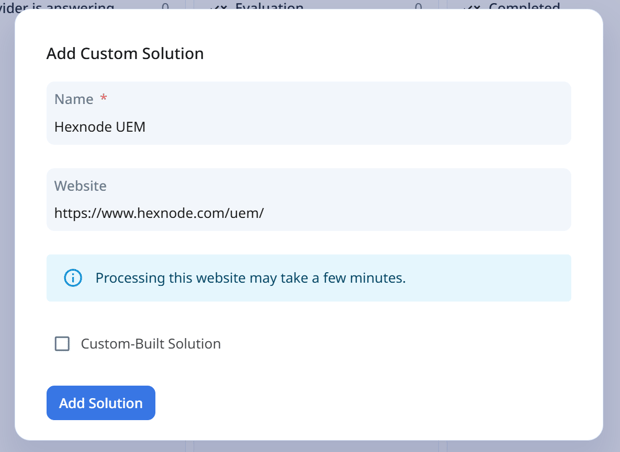
Note: Only tick the "Custom-Built Solution" box if the solution is actually an internally developed solution. If you are adding a commercial product with a web URL, simply leave the field unticked.
What happens after creating the tool?
Once you have created the tool, our system automatically gathers information from the website you provided. So there is nothing more for you to do: the tool is enriched on its own with relevant web content about the vendor and the solution.
This information then becomes available for evaluation, specifically:
- in the Shortlist AI evaluations, where the tool is evaluated against your requirements like any other
- in the use case assessment, where its suitability for your specific use cases is examined
This way you receive an AI evaluation for tools you created yourself as well.
Your tools stay within your tenant and initiative
Tools you create yourself exist exclusively within your tenant and inside the initiative in which they were created. They are only visible to participants in your initiative and have no connection whatsoever to the central Stackgini tool database.
This also means: you can create your own tool even if a similar or identical solution already exists in the Stackgini database. Both exist independently of each other.
Tip: add further content such as documents
For a tool you created yourself, you can also upload your own documents, for example quotes or product materials that are not public. These are likewise factored into the AI evaluations. Learn more in the article Adding Content To Tools