
Content:
1. Overview
Compare solutions and speed up decision-making processes
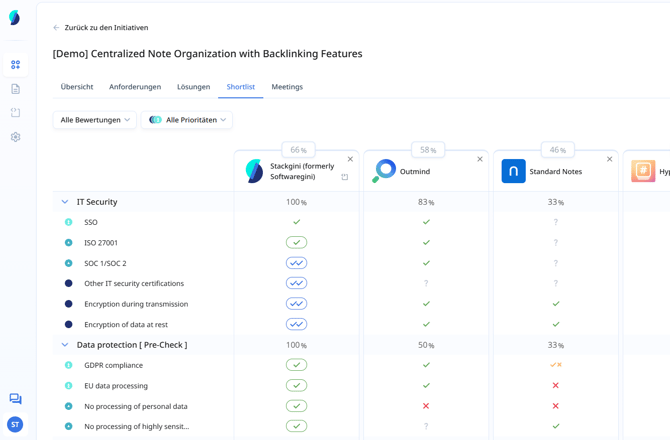
The shortlist view in Stackgini allows you to evaluate solutions in a structured way and compare them directly with each other. You can see at a glance which solution fulfils which requirements - supported by AI analyses, provider information and your internal evaluation. The shortlist is also helpful for quickly displaying the results of the analysis, but also for going down into the details of individual requirements and evaluations if required.
2. When is this article relevant?
Typical application scenarios for the shortlist:
- You have several solutions that you would like to compare in a structured way.
- You want to make a decision based on requirements, priorities and your assessments.
- You want to present the results of your detailed analysis to stakeholders in an easily digestible way.
3. Step-by-step instruction
How to use the shortlist effectively
a. Add solutions to the shortlist
- Navigate to the ‘Solutions’ tab in the initiative.
- Add a solution via the context menu or the ‘+ Add to shortlist’ button.
- Alternatively, you can click on ‘+’ directly in the ‘Shortlist’ tab and select saved solutions there
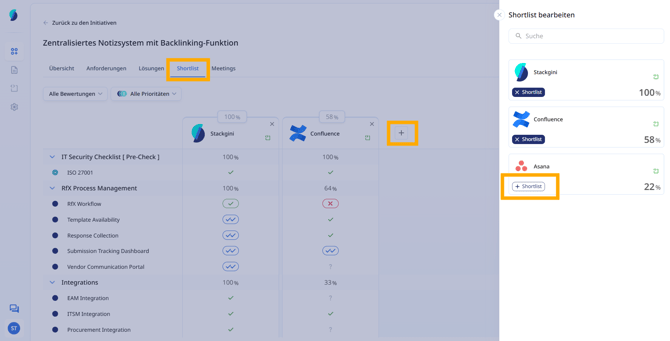
Please note that only solutions that have already been added to the initiative are eligible for the shortlist. More information on how to add solutions to the initiative can be found here:
How do I find suitable solutions and add them to the initiative?
How do I use the manual solution search?
b. Trigger the AI evaluation
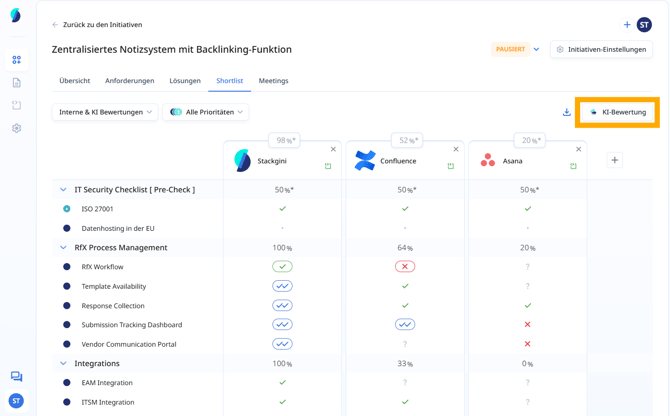
By clicking on ‘AI evaluation’, the Stackgini AI starts the evaluation of your requirements against the added solutions.
A more comprehensive guide to using evaluations can be found here:
How Do I Create an AI-Based Evaluation of Requirements?
Only use cases that contain requirements are included in the shortlist and can be evaluated. ‘Empty’ use cases are not displayed.
The AI evaluation can take a few minutes. You can track the progress when expanding use cases.
A detailed description of the evaluation logic can be found here:
How do I interpret AI suggestions with AI assessments?
c. Use filter options
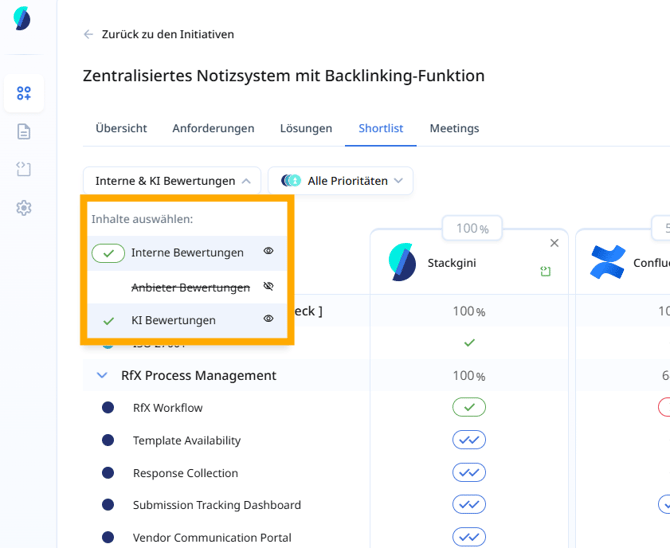
Two central filters help you to analyse relevant information in a targeted manner:
- Select data sources: Show only internal reviews, only provider details, only AI reviews or a combination of these.
- Filter by priority: Filter only MUST, SHOULD or COULD requirements, for example.
d. What do the rating symbols mean?
The evaluation symbols represent the degree of fulfilment of a requirement for a given solution.
The following breakdown applies:
Symbol |
Meaning |
|
|
No assessment possible / open. |
|
|
Requirement is not fulfilled. |
|
|
Rated as partially fulfilled. |
|
|
Rated as fulfilled. |
|
|
Rated as fulfilled in your internal assessment. |
|
|
Rated as excellent in your internal assessment / expectations exceeded. |


e. Details on AI ratings
Clicking on the rating icons opens the side drawer, in which you can see the reasoning on why the rating was picked in detail and all rating sources.
For example, the reasoning and evidence for a rating provided by the AI or the provider can be viewed here in detail.
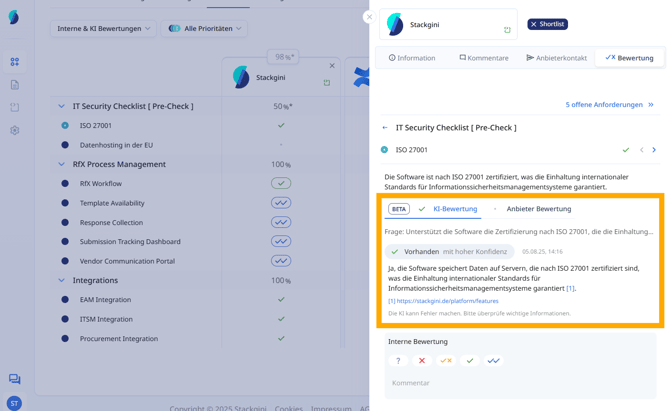
For a detailed description of how internal evaluations can be created, please refer to the following article:
f. Evaluation at use case level
Requirements are grouped within use cases. Each use case contains a series of requirements, each with an individual rating. The match score for each use case is the sum of all ratings for the requirements contained in it.
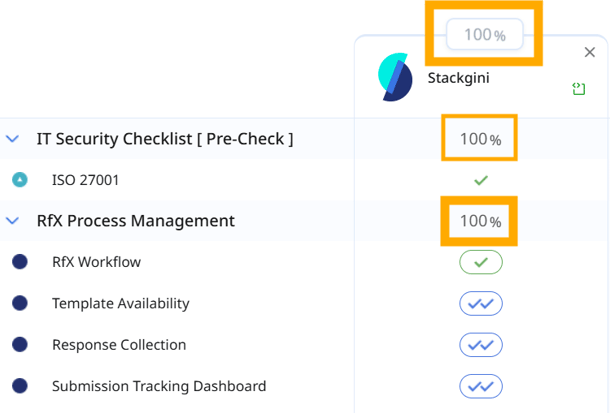
Read here how the percentage values are calculated:
How the match score works in Stackgini
4. Tips & Best Practices
How to get the most out of the Shortlist
- Use the filter function, for example, to quickly check knock-out criteria and their degree of fulfilment at a glance.
- Complete your internal evaluation after discussions with providers - this is the final evaluation and synthesis of your impressions.
- Use the Shortlist to clearly communicate all your results and evaluations to stakeholders.