
Content:
- How do I create a template?
- How do I create a template from an initiative?
- Who should create templates?
A template represents a use case with predefined requirements that can be imported into an initiative. It can be created either in the Templates area or directly from an initiative.
To be able to create templates, you need the ‘Create and manage templates’ authorisation. You can find more information here: Role and authorisation management
1. How do I create a template?
In the template area, a template can be defined analogue to a use case:
- Create a new template
- Enter the relevant requirements
- Define priorities, declaration and verification obligations as well as provider issues
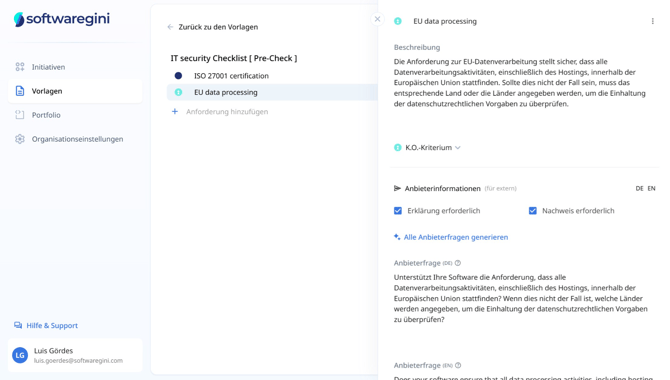
Optionally, the template can be automatically added to new initiatives by ticking ‘Automatically import template into each new initiative’ - ideal for use cases that are required in every initiative (e.g. data protection or information security requirements).
2. How do I create a template from an initiative?
If, while editing an initiative, you realise that a use case is particularly suitable for use as a template (e.g. because it has already been used several times), you can define it as a template directly from the initiative:
- Open the desired use case within the initiative
- Click on ‘Save as template’
- The use case is now saved as a template and is available for future initiatives
.png?width=670&height=372&name=June%203%2c%202025%2010_52_21%20AM%20-%20Screenshot%20(1).png)
Please note that this template is not automatically imported into future initiatives. To do this, you must customise the template in the ‘Templates’ tab. Information on how to import templates can be found here: How do I add a template to an initiative?
3. Who should create templates?
Departments such as purchasing, the works council, data protection officers or information security often define templates for non-functional requirements that apply across departments.
Determine who is responsible for templates in the settings and give these people the necessary authorisations.
Further information on assigning roles and authorisations can be found here: Role and authorisation management